GUIDE: How to Automate Travel Company Workflows and Reduce Manual Work
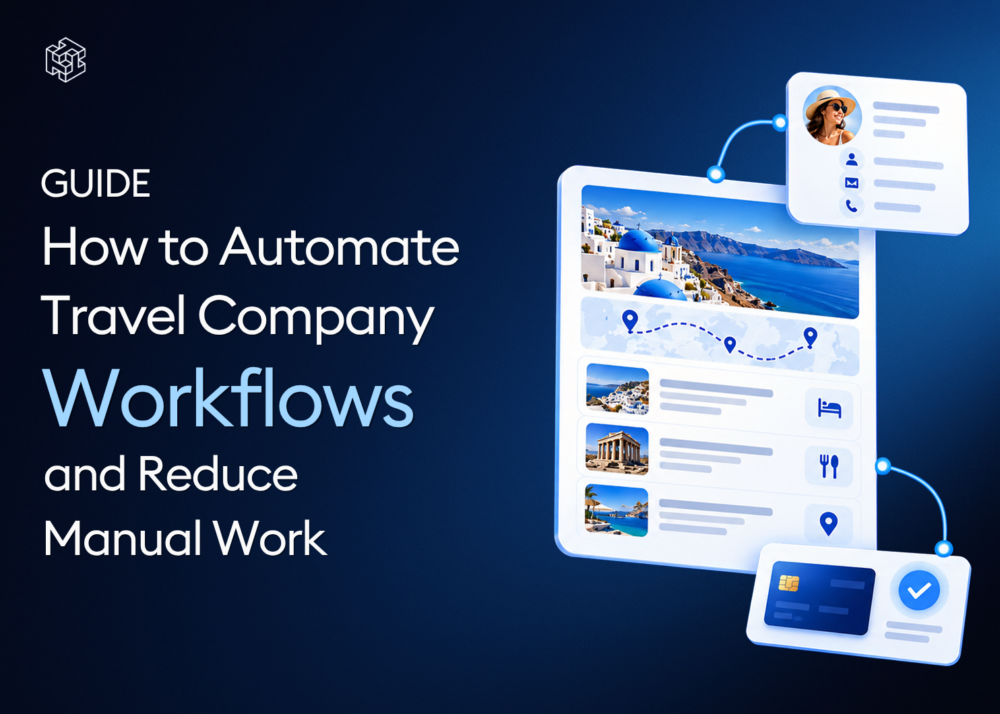
Travel company workflow automation uses connected software to reduce repetitive administrative tasks across inquiries, client management, itinerary creation, pricing, payments and document delivery.
The goal is not to remove travel professionals from the process. It is to eliminate unnecessary copying, rebuilding, searching and updating so agents can spend more time planning trips, communicating with clients and managing the decisions that require their expertise.
A connected workflow allows information to move through the booking process without being manually recreated at every stage:
Inquiry → Trip Request → Itinerary → Pricing → Offer → Booking → Payment → Documents
Key Takeaways
- The best tasks to automate are frequent, repetitive and based on consistent rules.
- Automation should reduce data entry and document handling while preserving human review.
- Reusing client, supplier, product and itinerary data delivers more value than automating isolated actions.
- Agencies should begin with one high-friction workflow rather than trying to automate the entire business at once.
- Automation is successful when it reduces processing time, errors and the number of tools required to manage a booking.
Where Manual Work Hides in Travel Operations
Manual work is not always obvious. A single action may take only a few minutes, but repeating it across every inquiry and booking creates a significant operational burden.
Consider a typical custom trip request.
A client sends an email asking for a ten-day itinerary. An agent copies the client’s information into a spreadsheet or CRM, searches previous proposals for inspiration, checks supplier files, writes the itinerary in a document, calculates the price in a separate spreadsheet and sends the result as a PDF.
The client then asks for a different hotel.
The agent updates the itinerary, recalculates the price, exports another document and sends a new attachment. When the traveler is ready to book, the team checks the payment in another system and later sends vouchers and invoices through several emails.
None of these tasks may appear unusually difficult. The problem is that the same information is handled repeatedly.
Common sources of manual work include:
- Copying contact details between systems
- Re-entering trip dates and passenger information
- Searching emails and folders for supplier rates
- Copying hotel and activity descriptions into proposals
- Rebuilding similar itineraries from a blank page
- Calculating prices and margins in separate spreadsheets
- Creating a new PDF after every itinerary change
- Matching payments with the correct client and booking
- Sending documents through multiple email conversations
- Updating the same information in several places
What Is Travel Company Workflow Automation?
Travel agency workflow automation is the use of technology to complete, simplify or connect recurring operational tasks with less manual input.
Automation does not always mean that a task happens without a person.
In many cases, the greatest improvement comes from making information reusable. A supplier entered once can be connected to products. A product stored in inventory can be selected while building future trips. A reusable itinerary can be adapted instead of recreated. A payment can remain connected to the relevant client and booking.
This is the difference between automating an isolated action and improving the entire workflow.
An isolated automation might send an email when a form is submitted. A connected workflow carries the submitted information into the next operational stage so the team does not need to enter it again.
What Should Travel Companies Automate First?
The first process should be selected according to operational impact rather than novelty.
A strong candidate for automation usually has four characteristics:
It Happens Frequently
A task completed once a year is unlikely to produce a meaningful return. Look for work repeated with every inquiry, offer or booking.
It Follows a Predictable Structure
Tasks are easier to automate when the required information and next steps are consistent.
It Requires Repeated Data Entry
If employees copy the same information between tools, the process creates both additional work and a risk of error.
It Delays the Client
Prioritize internal tasks that directly affect response time, proposal delivery, booking or payment.
A simple way to evaluate a process is to ask:
- How often does the team perform it?
- How long does it take?
- How many systems are involved?
- What happens when the information is entered incorrectly?
- Does the task require expert judgment or primarily administration?
The best starting point is usually a high-frequency administrative task that does not require a unique decision every time.
8 Travel Company Tasks You Can Automate
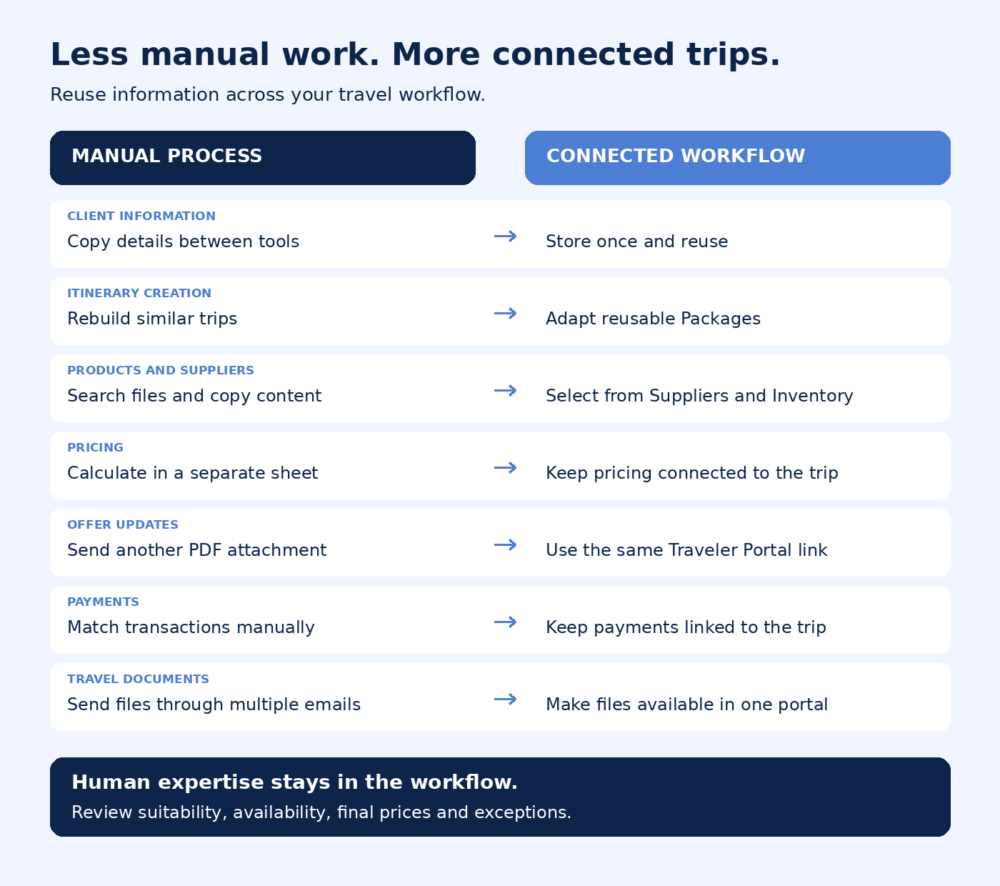
1. Capturing Client and Trip Information
Manual process
An inquiry arrives through a website form or email. The agent copies the traveler’s name, contact details, dates, destination and preferences into another system before planning can begin.
If the same information is later needed in the itinerary, payment record or invoice, it may be entered again.
Connected workflow
Client information is stored in a centralized contact profile and associated with the relevant Trip Request. The request becomes the starting point for itineraries, communication and booking activity.
Human review
The agent confirms that dates, passenger details and special requirements are complete before preparing the offer.
2. Creating Similar Itineraries
Manual process
An agency receives another request for a destination it sells regularly. An agent opens a blank document, finds an older proposal and copies the relevant sections into a new itinerary.
Descriptions, services and prices are edited manually.
Connected workflow
Frequently used itineraries are stored as reusable Packages. The agent selects an existing structure and adjusts the dates, products, route and client-specific details.
If existing itineraries are stored in PDF format, AI Import can convert them into structured trips ready for review.
Human review
The agent confirms availability, replaces unsuitable services and personalizes the experience for the new traveler.
3. Adding Products to a Trip
Manual process
Hotel descriptions, transportation details and experiences are copied from supplier websites, contracts, documents or previous offers whenever they are needed.
Different agents may use different versions of the same information.
Connected workflow
Travel products are stored in a structured Inventory and connected to the relevant suppliers. Agents can select existing accommodation, transportation and experiences while building a trip.
Descriptions, images, rates and policies are reused rather than recreated.
Human review
The agent selects the products that best match the traveler’s requirements and checks any booking-specific conditions.
4. Managing Supplier Information
Manual process
Supplier contacts, contracts, rates, payment terms and cancellation policies are distributed across email inboxes, spreadsheets and shared folders.
Agents spend time finding the correct document and confirming whether the information is still current.
Connected workflow
A centralized Suppliers module stores supplier information, products, contacts, documents, policies, margins and relevant contracts.
The supplier data becomes part of the same workflow used to build and price trips.
Human review
The team maintains supplier relationships, negotiates conditions and updates information when a contract changes.
5. Calculating Prices and Margins
Manual process
The itinerary is created in one tool while supplier costs, markups and final prices are calculated in a spreadsheet.
When the client requests a change, the agent must update both the itinerary and the calculation.
Connected workflow
Products, pricing and margins remain connected to the trip. Changes can be reflected within the same working environment rather than recalculated through an unrelated document.
Human review
The agent checks the final sales price, confirms the correct supplier conditions and ensures that the trip meets the company’s margin requirements.
6. Revising and Sharing Offers
Manual process
Every requested change creates another proposal file.
The traveler may receive several attachments with similar names and may not know which itinerary or price is current.
Connected workflow
The agent updates the trip and shares it through a Traveler Portal. The traveler returns to the same link to review the current itinerary, pricing and terms.
Human review
The agent decides which changes to apply, confirms the updated price and controls when the revised offer is ready for the traveler.
7. Tracking Payments
Manual process
The finance or operations team checks the payment platform and then searches for the client or booking associated with the transaction.
Payment status may also be recorded in a separate spreadsheet.
Connected workflow
Payment types, amounts, statuses, fees and additional charges are connected to the relevant trip through the Payments module.
The team can review payment information in the context of the booking.
Human review
Refunds, exceptions, reconciliation and unusual payment situations still require responsible financial oversight.
8. Delivering Travel Documents
Manual process
Invoices, vouchers, tickets and final travel information are sent through separate emails at different stages.
Travelers may contact the agency again because they cannot find the correct document.
Connected workflow
Documents remain associated with the trip and can be made available through the Traveler Portal. Clients return to one location for the current itinerary and relevant files.
Human review
The agent verifies that documents are accurate and complete before making them available to the traveler.
What Should Not Be Fully Automated?
Some travel decisions require context, responsibility and professional judgment.
These include:
- Understanding an incomplete or emotional client request
- Determining whether an itinerary is realistic
- Selecting between similar supplier options
- Negotiating special rates and exceptions
- Setting the final sales price
- Reviewing cancellation and payment conditions
- Managing accessibility and special requirements
- Responding to disruptions during travel
- Resolving complaints and sensitive situations
- Making personalized recommendations
Automation should prepare the information and remove repetitive work surrounding these decisions. The travel professional should remain responsible for the outcome.
How to Automate a Travel Company Workflow Step by Step
Step 1: Map the Current Process
Choose a typical booking and document every action from the initial inquiry to final document delivery.
Include each system, spreadsheet, folder, email and approval involved.
Step 2: Identify Repeated Work
Mark every point where the team:
- Enters information already available elsewhere
- Searches for a file or previous offer
- Copies descriptions or prices
- Creates another version of the same document
- Switches tools to complete the next step
These are the strongest opportunities for improvement.
Step 3: Standardize the Information
Automation depends on structure.
Standardize contact fields, product names, supplier profiles, itinerary formats, pricing rules and workflow statuses before trying to automate them.
Step 4: Choose One Workflow
Begin with one process that produces a visible operational benefit.
For example, an agency that repeatedly rebuilds destination programs may begin with reusable packages. A DMC struggling with supplier information may begin with Suppliers and Inventory.
Step 5: Define Human Checkpoints
Decide which actions can happen automatically and which require approval.
An imported itinerary should be reviewed. A calculated price should be confirmed. A payment exception should be investigated.
Step 6: Connect Related Processes
Once the first process is working, connect it to the next stage.
A reusable package becomes more valuable when its products, supplier information, pricing and traveler-facing offer are connected.
Step 7: Measure the Result
Track operational indicators before and after implementation.
Useful measurements include:
- Time required to create the first proposal
- Number of manual entries per booking
- Time required to complete a requested revision
- Number of tools used for one booking
- Frequency of pricing or version errors
- Time spent finding supplier information
- Number of emails required to deliver documents
Automation should produce a measurable reduction in effort, not simply introduce another tool.
Common Travel Company Automation Mistakes
Automating a Disorganized Process
Technology cannot make an unclear workflow reliable. Standardize the process before automating it.
Adding Another Disconnected Tool
A new tool may solve one task while creating additional data transfers elsewhere. Consider how it connects with the complete booking workflow.
Removing Human Review
Automation reduces administration, but important travel, pricing and financial decisions still require oversight.
Trying to Automate Everything at Once
Large changes are difficult to test and adopt. Start with one process and expand after the team understands the new workflow.
Measuring Features Instead of Results
The number of automated actions is less important than the time saved, errors avoided and improvements experienced by clients and employees.
How TripMatrix Reduces Manual Work
TripMatrix connects the operational stages that frequently require travel teams to copy information between systems:
Contacts → Trip Requests → Suppliers and Inventory → Packages → Itinerary → Pricing → Traveler Portal → Payments
The platform allows teams to reuse client, supplier, product and itinerary data across the workflow.
Agents can start with reusable Packages instead of rebuilding common itineraries, select existing services from Inventory, manage supplier information centrally, calculate trip prices and share the current offer through the Traveler Portal.
Payments and documents remain connected to the relevant trip, giving the team a clearer view of each booking.
TripMatrix reduces the repetitive operational work while travel professionals remain responsible for the decisions that require their expertise.
Frequently Asked Questions
What can a travel company automate?
Travel companies can automate or simplify contact management, Trip Request creation, itinerary reuse, product selection, pricing calculations, proposal updates, payment tracking and document delivery. Human review should remain part of decisions involving suitability, pricing, supplier exceptions and client support.
Which travel company workflow should be automated first?
Begin with a frequent and repetitive process that creates delays or duplicate data entry. Rebuilding similar itineraries, managing supplier data and updating proposals are common starting points.
Can small travel companies use workflow automation?
Yes. Automation can be particularly valuable for small agencies because each employee often manages sales, planning, operations and client communication. Reducing administration creates more time for revenue-generating and client-facing work.
Does automation replace travel agents?
No. Automation reduces rule-based administrative work. Travel agents remain responsible for understanding client needs, selecting services, reviewing itineraries, setting prices and managing exceptions.
How do you measure travel company automation?
Measure the time required to prepare and revise offers, the number of manual entries per booking, the number of tools used and the frequency of pricing, data or version errors.
What causes travel automation projects to fail?
Common causes include unclear processes, inconsistent data, insufficient training, disconnected tools, missing review points and attempting to automate too many workflows at once.
Is workflow automation the same as back-office software?
No. Workflow automation describes how repetitive processes are reduced or connected. Travel agency back-office software is the system used to manage operational areas such as clients, suppliers, inventory, itineraries, pricing, payments and documents.
Reduce the Work Behind Every Booking
Travel companies do not need to automate the expertise that makes their service valuable.
They need to remove the repeated copying, rebuilding, searching and updating that surrounds it.
TripMatrix connects the workflow from inquiry to payment, allowing travel teams to reuse information, manage trips more efficiently and keep travelers informed through one connected platform.
Interested to see how
TripMatrix can supercharge your
travel business?
Request a Demo
Published on: October 8, 2026