From Generic to Gorgeous: Build a Premium Travel Website With TripMatrix’s New CMS Themes – No Developer Needed
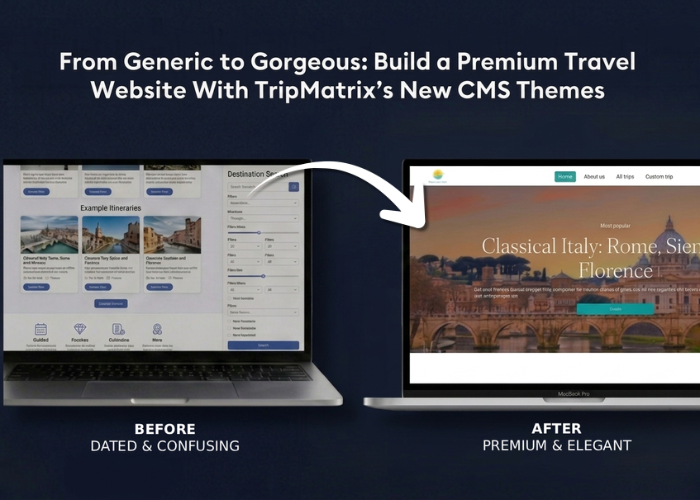
Why Your Website Is Your Most Important Sales Tool
Before a traveler ever picks up the phone, sends an email, or fills out an enquiry form, they’ve usually already formed an opinion about your travel company, and they formed it on your website.
For travel agencies, DMCs, tour operators, and independent advisors, a website isn’t just a digital brochure sitting in the corner of the internet. It’s often the very first, and sometimes the only, impression a potential client gets before deciding whether to trust you with their trip, their budget, and their time off.
Think about how travelers actually behave today. They browse on their phones during a commute, compare a handful of agencies side by side, and form snap judgments within seconds. A website that looks dated, generic, or visually inconsistent can quietly cost you bookings – even if your itineraries are exceptional and your service is outstanding. On the other hand, a polished, on-brand website does a lot of work for you before your team ever picks up the phone:
- It builds instant credibility and trust
- It tells a visual story about the kind of experiences you create
- It keeps visitors engaged long enough to actually explore and enquire
- It reinforces your brand identity across every page, from the homepage to a single destination
The challenge, historically, has been that “looking premium” meant briefing a designer, hiring a developer, and waiting weeks — sometimes months — for even small changes. That’s not realistic for travel businesses that are juggling itineraries, suppliers, and client requests every single day.
That’s exactly the gap the new CMS website templates in TripMatrix are designed to close.
What’s New: More Customization, a More Luxurious Look
The latest update to the TripMatrix CMS introduces a brand-new website theming system, giving you significantly more control over how your TripMatrix-powered website looks and feels — directly from the CMS, with zero coding required.
At the heart of the update are three theme options:
- Classic – a clean, timeless design that applies your brand color with no further configuration needed.
- Elegant – a beautifully designed, ready-made theme. You apply your primary brand color, and the rest is already taken care of for you.
- Custom – full creative control. Choose your color, your font pairing, and the shape, appearance, and style of every button, card, and component across your site.
Whichever path you choose, the result is the same: a more refined, more luxurious website that feels like it was built specifically for your brand, because, in a very real sense, it now has been.
Where to Find It: Web Settings → Theme
Everything lives in one place inside the TripMatrix CMS, and it only takes a few clicks to get there:
- Open CMS from the left-hand menu
- Go to the Website tab
- Click Web Settings in the top-right corner
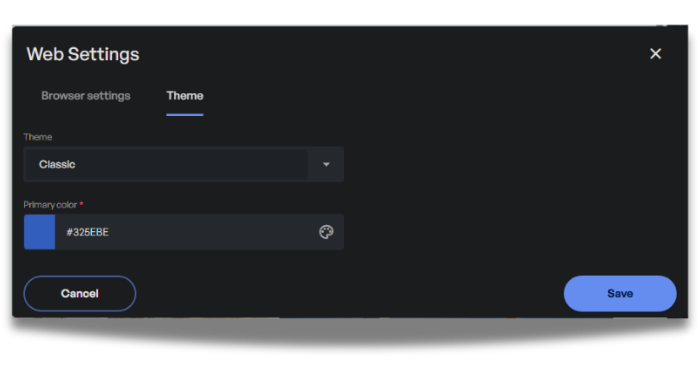
- Select the Theme tab inside the Web Settings panel
From here, you’ll see a Theme dropdown where you can choose between Classic, Elegant, and Custom. Let’s walk through what each one offers.
Option 1: Classic – Clean, Timeless, Ready in Seconds
Classic is the most straightforward path to a professional-looking website. The layout, typography, and component design are all handled for you. All you provide is your primary brand color, and TripMatrix takes care of the rest.
It’s the ideal starting point if you want to get up and running quickly without making any design decisions beyond your core brand color.
Option 2: Elegant – A Premium Look, Tailored to Your Brand in Minutes
If you want a refined, professional design without thinking about layout, spacing, fonts, or button styles, Elegant is your fastest route to a beautifully crafted website.
The entire visual structure – layout, typography, spacing, and component design – is already designed and optimized for travel websites. All you need to do is tell TripMatrix what your primary brand color is, and it will be applied consistently across buttons, highlights, and key visual elements throughout the site.
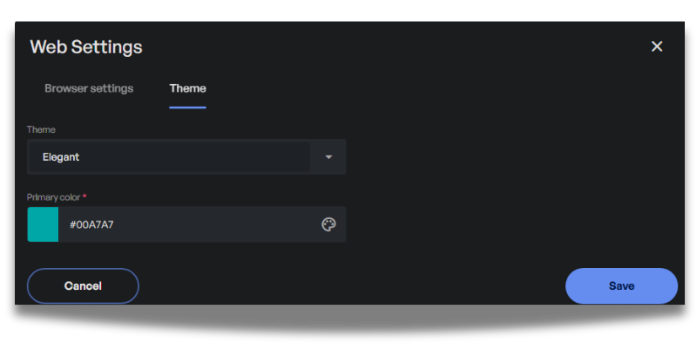
Type in a hex code or use the built-in color picker, hit Save, and your live website instantly reflects your brand color – applied consistently across the homepage, destination pages, trip templates, forms, and every other corner of your site.
Elegant is the perfect option if:
- You want a quick, high-quality visual refresh
- You don’t have strong opinions about fonts, button shapes, or layout details
- You want a great-looking website live today, not next month
Option 3: Custom – Design a Website That’s Truly Yours
For travel companies that want to go a step further and build a website that feels distinctly theirs, the Custom theme opens up a full set of design controls. still without touching any code.
When you select Custom from the Theme dropdown, additional options appear alongside your color setting:
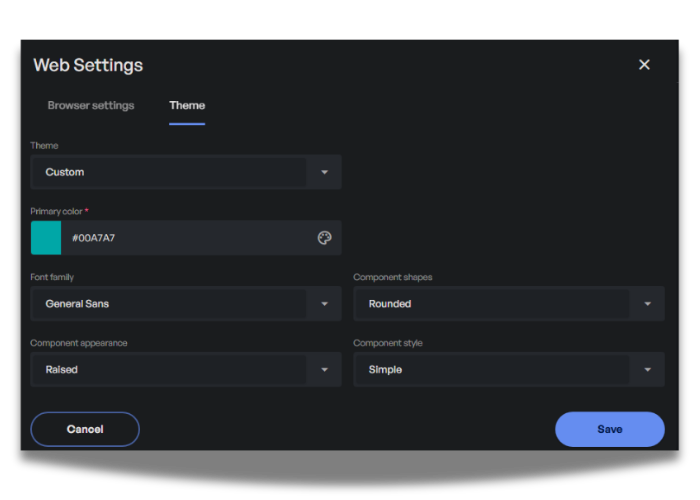
Primary Color
Define your core brand color here. With Custom, this interacts with the wider set of design choices below, giving you a fully cohesive look across the entire site.
Font Family
Choose a font pairing for your website: for example, a clean, modern sans-serif (such as General Sans) for a contemporary look, or a distinctive serif typeface for headings combined with a body font of your choice. Typography is one of the biggest drivers of how “premium” a website feels, and it’s now a simple dropdown choice.
Component Shapes
Decide how rounded, or sharp, the elements on your site should feel:
|
Option |
Feel |
|
Squared |
Clean, structured corners for a modern look |
|
Rounded |
Softened corners for a friendlier feel |
|
Circular |
Fully rounded elements for a bold, playful style |
Component Appearance
Control how buttons, cards, and other interactive elements are rendered:
|
Option |
Feel |
|
Flat |
Minimal, clean fills with no shadows or borders |
|
Outlined |
Defined borders for a crisp, structured look |
|
Raised |
Subtle depth and shadow |
Component Style
Set the overall visual intensity of your interface:
|
Option |
Feel |
|
Simple |
A minimal, understated aesthetic where color is used sparingly |
|
Colored |
A bolder approach where your brand color shows up more prominently |
Mix and match these settings to create a look that matches your brand’s personality. A sleek, minimalist boutique agency might go for Squared + Flat + Simple, while a vibrant adventure-travel brand might prefer Rounded + Raised + Colored. There’s no wrong combination, just the one that feels right for the experiences you sell.
A Few Tips If You’re Not a Designer
You don’t need a design background to get great results, but a couple of simple guidelines go a long way:
- Start with your logo’s primary color. This is usually your most recognizable brand color, and TripMatrix will apply it consistently across your entire site.
- Match your fonts to your tone. A serif heading font tends to feel elegant and editorial -great for luxury or cultural travel. A clean sans-serif feels modern and efficient – great for adventure or budget-friendly brands.
- See changes instantly. Updates to your colors and fonts are reflected on your live site as soon as you make them. Don’t be afraid to test different combinations—you can adjust your settings at any time.
See It in Action
Want to see what’s possible with the new themes? Take a look at this live example:
Notice how the homepage layout, the destination highlights, and the trip showcase blocks all carry a consistent, polished visual identity from top to bottom – all built using the same CMS tools now available to you, without a single line of custom code.
Built Without a Developer, Backed by Real Design
This is where the new CMS themes really shine: every option (from theme selection to color pickers to font and component styling) is presented as simple dropdowns, color swatches, and toggles inside the CMS interface you already use every day.
There’s no need to:
- Brief a developer or wait for a design sprint
- Write or edit any CSS, HTML, or templates
- Worry about breaking your website while experimenting
Make a change, click Save, and see it reflected on your live site immediately. Want to try a different combination for a seasonal campaign or a new market? Adjust the settings, save again, and you’re done – in minutes, not weeks.
Fully Integrated With Your TripMatrix Back Office
Here’s the part that makes this update especially powerful: no matter which theme or styling combination you choose, your website remains fully connected to TripMatrix behind the scenes.
That means:
- Every enquiry submitted through your website’s contact or trip request forms is automatically logged in Trip Requests– No manual data entry, no leads getting lost in an inbox
- Trip-specific enquiries (for example, someone enquiring about a particular package) arrive with a direct link back to that package, so your team has full context immediately
- Contact details from website visitors flow straight into your Contacts, ready for follow-up
In other words: you get a beautifully redesigned front door for your business, with no change to how leads and requests flow into your day-to-day operations.
Why This Update Matters for Your Business
To sum it up, here’s what the new CMS themes give travel companies:
- A premium, custom look without hiring a designer or developer
- Two paths to suit your needs – a fast, polished refresh with Elegant, or full creative control with Custom
- Brand consistency – your colors, fonts, and component styles applied automatically across your entire website
- Confidence to experiment – change your look in minutes, with an instant preview on your live site
- Zero disruption to your workflow – every enquiry still flows directly into TripMatrix, exactly as before
Ready to Refresh Your Website?
Whether you’re after a quick brand-color update or a complete visual overhaul, your next website redesign is just a few clicks away.
If you have any questions or want a hand choosing the right setup for your brand, our support team is always happy to help.
Interested to see how
TripMatrix can supercharge your
travel business?
Request a Demo
Published on: June 22, 2026